My Cloud Portfolio Journey
Introduction#
 Welcome to my cloud portfolio journey!
I’m excited to share how I built this website and cloud project as a showcase of my skills and values.
My portfolio at TuckerMcLean.com was intended as both a learning experience and a showcase of my skills and values as an IT professional. I hoped to produce something worthy to display as a plaque of my skills beside my AWS certification(s). But first, I had some work to do.
Preparation#
I studied the AWS SkillBuilder materials for a couple of weeks. Then I took the test and got my AWS Certified Cloud Practitioner. I then had a solid brainstorming session and centered on a couple of goals:
Create a dynamic portfolio site hosted on AWS.
Showcase expertise in cloud architecture, full-stack development, and frontend UI design.
Frontend Development#
I started setting the foundation. First, I wanted something pretty to look at as I was doing backend development. So, I roughed out the frontend first. I am rather fond of classic graphical user interfaces. I thought, how nifty would it be if my resume site could look a bit like OpenStep? So, I decided to make a simulated desktop environment. I would handcraft one with HTML, CSS, vanilla JavaScript, and the DOM. Maybe it’s a little obsessive, but oh well.
My priorities for the design were:
A balance of retro functionality and a modern, responsive interface,
Look like an edgy Linux hacker from the Y2K times
Be accessible and printable
So, I got busy implementing the features of a window: maximize, minimize, drag, resize, shade, cascade, and tiling window management. I implemented light and dark mode support with a toggle that saves to the local storage. You can return to the page later and see your chosen state. I tweaked the windows and minimized icons to a point where I can say, I can’t justify spending any more time on this. The final design achieves a functional, retro-modern interface, balancing usability with aesthetic polish. I also set it up as a Vite project to allow for programmatically building the project. Importing JavaScript modules, linting, and building minified versions of the code are now possible. I’m happy it all works for now without needing any major rework.
Backend Development#
I began work on the cloud infrastructure. First, I set up an S3 bucket and a CloudFront distribution. Seeing the Terraform configuration deploy successfully was satisfying. After the certificates finished cooking, of course.
I began work on the cloud infrastructure. First, I set up an S3 bucket and a CloudFront distribution. Seeing the Terraform configuration deploy successfully was satisfying. After the certificates finished cooking, of course.
With a basic frontend good to go, it was time to build something requiring a backend. I’ve seen other people and their respective cloud journeys. Many of them built a simple page counter, which shows that they can write Lambda functions and tie them into an API Gateway. But, I know that I have more in me than that, even right out of the gate. So, I decided I would work on a meatier challenge: a chat box where the user can contact me, the admin and I can write back.
I started with a simple “Hello World” function. Starting small helped me master the fiddly bits of AWS API Gateway configuration. This foundational step laid the groundwork for the more complex implementations that followed. Once I did have good API configs for Terraform, I got to work on the chat API. Initially, I implemented a REST API with client polling for new messages. While functional, this approach lacked real-time communication. I recognized the potential of a WebSocket API for low-latency communications, so I reconfigured the Terraform setup and refactored the API to use a two-way WebSocket.
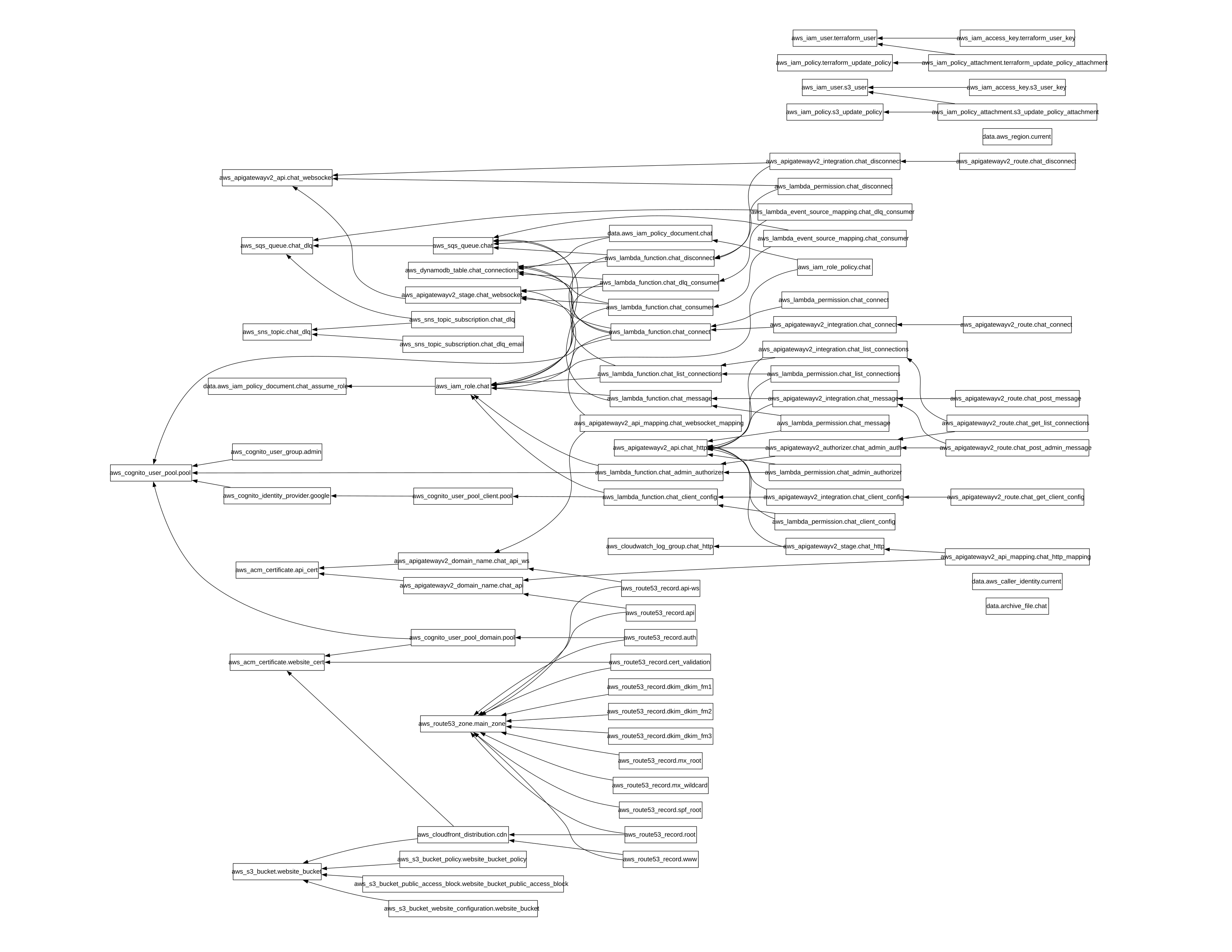
It was at this point that the humble Lambda function I started out with was becoming unwieldy. Dealing with the fan-out of messages to the right connections was doable. But, switching to Amazon Simple Queuing Service (SQS) would massively improve scalability. Also, by decoupling the Lambda functions, we would simplify message delivery. So, I split out the one Lambda into 8 loosely coupled microservices. This improved maintainability, separating concerns into smaller, separate scopes, also unlocking unlimited scalability.
I created a modern HTTP API with WebSocket push of messages to the clients. The client passively listens for new messages instead of polling. And now, the HTTP endpoints are authorized outside of the business code. I configured the API Gateway with a Lambda function authorizer, so now we keep it simple and avoid the security pitfalls of mixing concerns unnecessarily.
I built a Cognito user pool which uses Google as an identity provider. This, so I can authenticate and authorize an admin user to receive users’ messages and respond to them. It handles the whole OAuth/OIDC conversation, and at the end, it provides an access key that can be checked against Cognito at any time. Now, we can guard the API endpoints used for admin functions.
The messages Lambda gets a message, either from a guest, or an authorized admin, and adds it to the queue. A consumer Lambda picks it up and reads it. The consumer looks up the target WebSocket connection in DynamoDB to see if it’s still up. It delivers the message to that WebSocket connection and the user sees it appear on their screen. If the connection is down, or there is an error, it notifies the user. If the admin is around, it delivers the message from the guest. Or, if no admin is available, it queues the message until the admin logs in.
CI/CD and Automation#
With a working backend configuration, I began to automate frontend and backend deployment. At this point, the Terraform state and the state lock file were committed to the Git repo. This was problematic for many reasons, security being an obvious one. Also, keeping state locally means you cannot deploy from multiple locations at once. In order to set up a CI/CD pipeline to automate deployment, I had to centralize the Terraform state.
I migrated the local Terraform state into an S3 bucket, with lock info stored in DynamoDB. This improved security, enabled multi-location deployments, and paved the way for CI/CD integration. Terraform makes this migration pretty easy, but setting up the permissions was a bit of a hurdle. To explain:
I have two AWS accounts in an Organization under the root account, one for Development and one for Production. The Terraform state needs to be stored in a place outside of both, because it is shared between them. I manually created the S3 and DynamoDB resources under the root. I then delegated access to my IAM SSO user’s role for each of those two accounts. That way, Terraform uses the same AWS credentials when deploying resources or managing state.
Once the Terraform state was migrated, I could start setting up CI/CD. I needed to create some IAM users with key ID and secret for our deployment runner. Since the repos are on GitHub already, GitHub Actions seemed to be the natural choice. I worked up the steps and placed them into a workflow file, for each of the repos, frontend and backend. I saved the keys in GitHub secrets storage and gave it a run. Some formatting changes here, some policy tweaks there. And, now we have a complete solution. Now, I can develop in the dev environment, and when it’s time to deploy to prod, I can just push to master, super nice👌
I hope this project has inspired you to think about your own cloud journey. If you’d like to discuss this project or explore how I can contribute to your team, feel free to reach out! I’m eager to tackle new challenges and bring innovative cloud solutions to life. Send me an email or chat with me! I hope to hear from you soon.
TM